
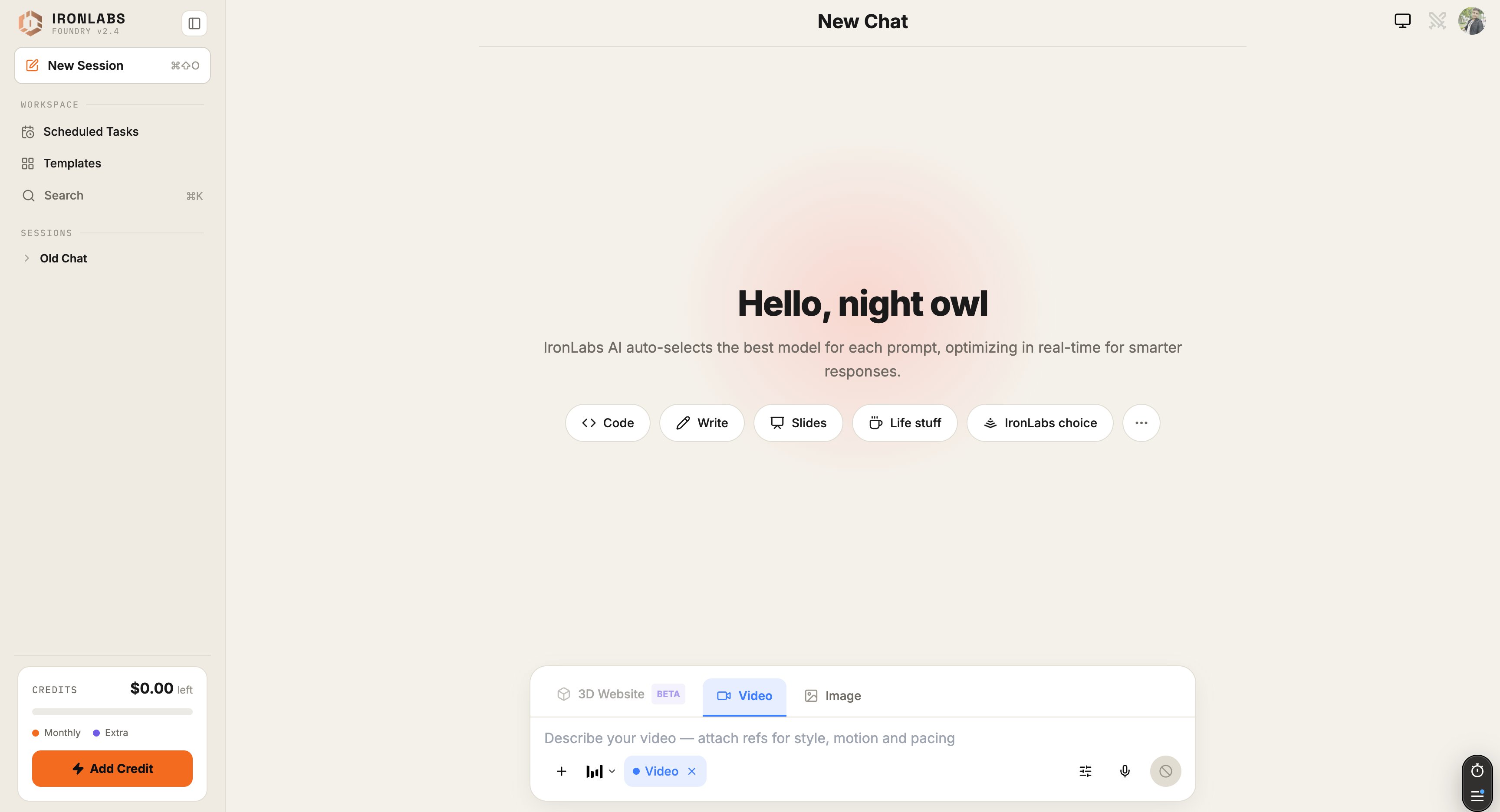
Sidebar
- Search (
⌘K) — global search across all your chats. - New chat (
⌘⇧O) — start fresh. - History — grouped Recent · Previous 7 Days · Older.
- Scheduled Tasks — shortcut to your task list.
- Toggle sidebar (
⌘B) — collapse to icons.
Composer (the input box)
The composer is keyboard-driven. A few inline triggers do the heavy lifting:Above the composer
- Mode pill — current mode (Chat / Image / Video / 3D / Agent / Deep Research).
- Sources pills — which sources are toggled on for the next prompt.
- Skills pill — which Skills are active.
Inside a reply
- Model footer —
Routed via <provider> / <model>so you always know who answered. - Reasoning block — collapsible card above the reply (if reasoning is on). See Live Reasoning View.
- Citations — under the reply, when sources are used.
- Regenerate / Edit / Copy — message actions.
Top right
- Mic — voice input. Click → speak → release.
- Image Mode toggle — also accessible via Settings → Image Mode.
- Settings — themes, reasoning effort (Pro), memory, notifications.