> ## Documentation Index
> Fetch the complete documentation index at: https://docs.ironlabs.ai/llms.txt
> Use this file to discover all available pages before exploring further.
# Sources
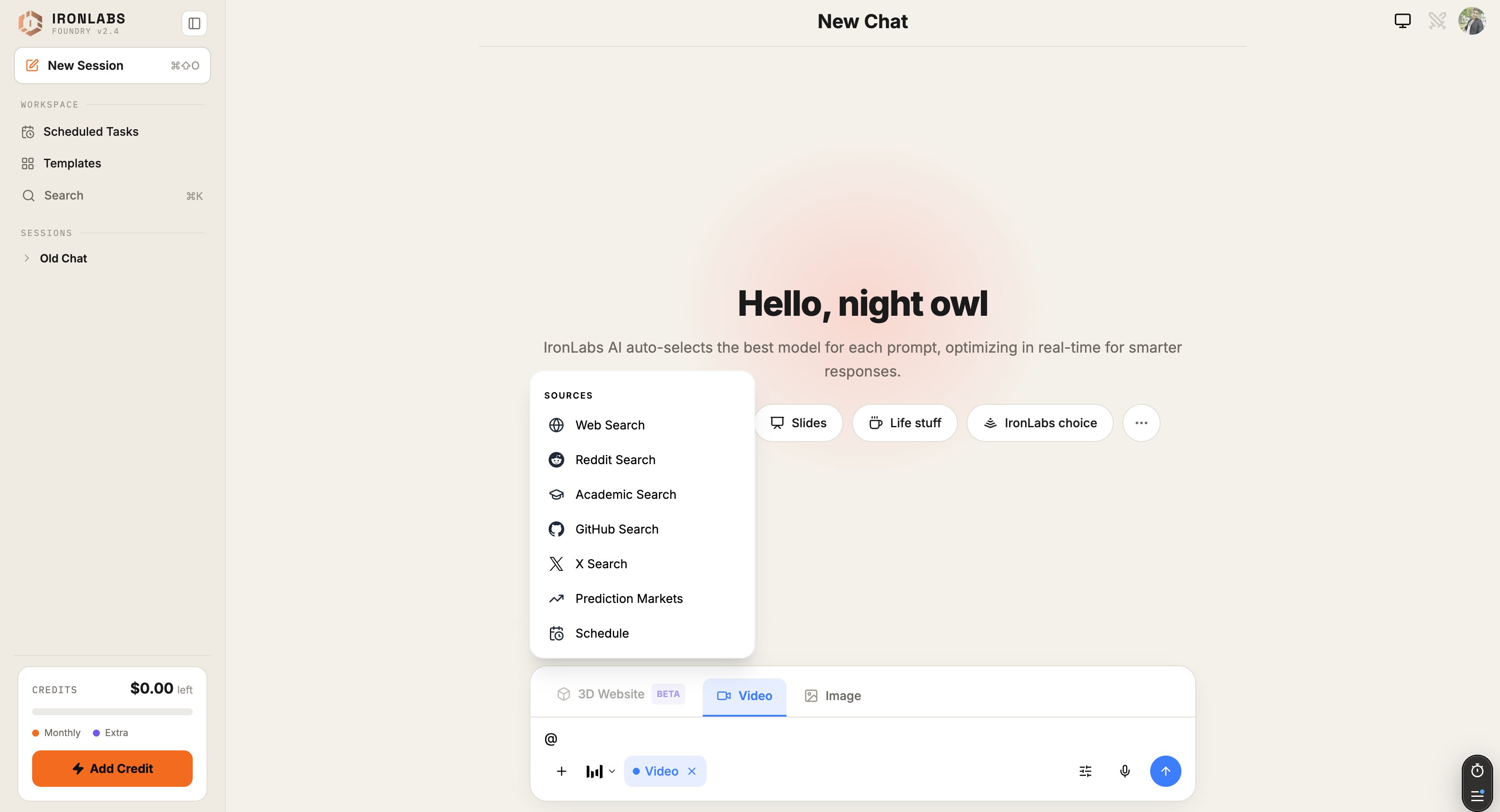
> Ground every reply in live data. Toggle Web, Deep Research, Reddit, X, Academic, or GitHub from the @ menu.
By default Foundry answers from the model's training knowledge. Toggle on a **Source** and the model goes and looks something up first — then cites what it found under the reply.
Type `@` in the composer to open the Sources menu.
 ## Built-in sources
| Source | Best for | Page |
| ---------------------- | -------------------------------------------------------- | --------------------------------- |
| **Web Search** | General fresh facts, news, product pages | [Web](/foundry/sources/web) |
| **Reddit Search** | Real-people opinions, anecdotes, troubleshooting threads | [Reddit](/foundry/sources/reddit) |
| **Academic Search** | Papers, peer-reviewed work, scholarly answers | — |
| **GitHub Search** | Code references, repos, issues | — |
| **X Search** | Breaking news, tech announcements, real-time sentiment | [X](/foundry/sources/x) |
| **Prediction Markets** | Polymarket / Manifold-style probability signals | — |
| **Schedule** | Anchor the prompt to a specific date/time window | — |
For **Deep Research** — the multi-step grounded answer — switch to that **mode** via `/` instead of toggling a single source. See [Deep Research](/foundry/sources/deep-research).
## How toggles work
Toggle one or more sources from the `@` menu. Your **next message** is grounded in those sources; toggles reset when you switch chats.
Foundry shows a **Sources pill** above the composer for every active source so you always know what your next prompt will hit.
## Citations
Every reply that used a source gets **citations** under the answer — clickable links to the source pages, with a short excerpt that the model leaned on.
## Tips
* **Stack sources** for harder questions. *Web + Reddit* gives you both the facts and the lived experience.
* **Reset between chats.** Sources don't bleed across chats by design.
* **Use Deep Research** when one round of search isn't enough. It fans out, reads, and synthesizes.
## Related
External services as sources — Exa, Firecrawl, Valyu, more.
The heavyweight option.
## Built-in sources
| Source | Best for | Page |
| ---------------------- | -------------------------------------------------------- | --------------------------------- |
| **Web Search** | General fresh facts, news, product pages | [Web](/foundry/sources/web) |
| **Reddit Search** | Real-people opinions, anecdotes, troubleshooting threads | [Reddit](/foundry/sources/reddit) |
| **Academic Search** | Papers, peer-reviewed work, scholarly answers | — |
| **GitHub Search** | Code references, repos, issues | — |
| **X Search** | Breaking news, tech announcements, real-time sentiment | [X](/foundry/sources/x) |
| **Prediction Markets** | Polymarket / Manifold-style probability signals | — |
| **Schedule** | Anchor the prompt to a specific date/time window | — |
For **Deep Research** — the multi-step grounded answer — switch to that **mode** via `/` instead of toggling a single source. See [Deep Research](/foundry/sources/deep-research).
## How toggles work
Toggle one or more sources from the `@` menu. Your **next message** is grounded in those sources; toggles reset when you switch chats.
Foundry shows a **Sources pill** above the composer for every active source so you always know what your next prompt will hit.
## Citations
Every reply that used a source gets **citations** under the answer — clickable links to the source pages, with a short excerpt that the model leaned on.
## Tips
* **Stack sources** for harder questions. *Web + Reddit* gives you both the facts and the lived experience.
* **Reset between chats.** Sources don't bleed across chats by design.
* **Use Deep Research** when one round of search isn't enough. It fans out, reads, and synthesizes.
## Related
External services as sources — Exa, Firecrawl, Valyu, more.
The heavyweight option.