> ## Documentation Index
> Fetch the complete documentation index at: https://docs.ironlabs.ai/llms.txt
> Use this file to discover all available pages before exploring further.
# Interface tour
> Every important control in the Foundry chat UI, labeled.
Foundry's UI is three regions: the **sidebar** (left, your history and shortcuts), the **conversation** (center, messages), and the **composer** (bottom, where you type).
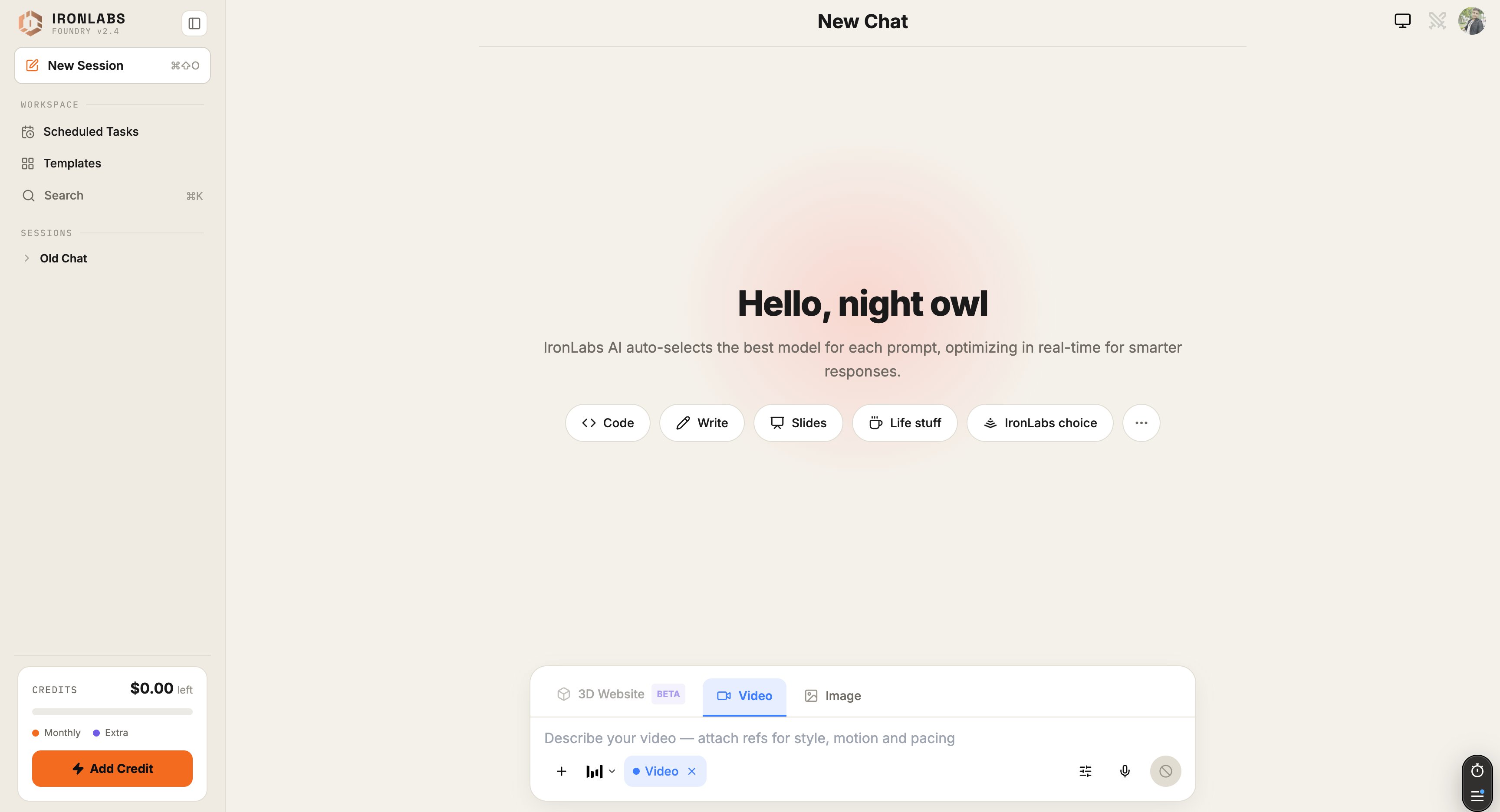 ## Sidebar
* **Search** (`⌘K`) — global search across all your chats.
* **New chat** (`⌘⇧O`) — start fresh.
* **History** — grouped **Recent · Previous 7 Days · Older**.
* **Scheduled Tasks** — shortcut to your task list.
* **Toggle sidebar** (`⌘B`) — collapse to icons.
## Composer (the input box)
The composer is keyboard-driven. A few inline triggers do the heavy lifting:
| Trigger | What it opens |
| ------- | ------------------------------------------------------------------------------------------------------------ |
| `@` | **Sources menu** — Web, Deep Research, Reddit, X, Academic, GitHub, plus your connected external connectors. |
| `/` | **Mode switcher** — Chat / Agent / Deep Research / Image / Video / 3D. |
| `+` | **Connectors** — quick toggle for connected services. |
| `⌘U` | **Upload files** — images, PDFs, audio. |
| `⌘/` | **All AI commands** — full keyboard cheatsheet. |
## Above the composer
* **Mode pill** — current mode (Chat / Image / Video / 3D / Agent / Deep Research).
* **Sources pills** — which sources are toggled on for the next prompt.
* **Skills pill** — which Skills are active.
## Inside a reply
* **Model footer** — `Routed via / ` so you always know who answered.
* **Reasoning block** — collapsible card above the reply (if reasoning is on). See [Live Reasoning View](/foundry/reasoning/live-view).
* **Citations** — under the reply, when sources are used.
* **Regenerate / Edit / Copy** — message actions.
## Top right
* **Mic** — [voice input](/foundry/chat/voice-input). Click → speak → release.
* **Image Mode toggle** — also accessible via Settings → Image Mode.
* **Settings** — themes, reasoning effort (Pro), memory, notifications.
## Keyboard-only flow
Everything above is reachable without the mouse. The full list lives in [Keyboard Shortcuts](/foundry/chat/keyboard-shortcuts).
## Sidebar
* **Search** (`⌘K`) — global search across all your chats.
* **New chat** (`⌘⇧O`) — start fresh.
* **History** — grouped **Recent · Previous 7 Days · Older**.
* **Scheduled Tasks** — shortcut to your task list.
* **Toggle sidebar** (`⌘B`) — collapse to icons.
## Composer (the input box)
The composer is keyboard-driven. A few inline triggers do the heavy lifting:
| Trigger | What it opens |
| ------- | ------------------------------------------------------------------------------------------------------------ |
| `@` | **Sources menu** — Web, Deep Research, Reddit, X, Academic, GitHub, plus your connected external connectors. |
| `/` | **Mode switcher** — Chat / Agent / Deep Research / Image / Video / 3D. |
| `+` | **Connectors** — quick toggle for connected services. |
| `⌘U` | **Upload files** — images, PDFs, audio. |
| `⌘/` | **All AI commands** — full keyboard cheatsheet. |
## Above the composer
* **Mode pill** — current mode (Chat / Image / Video / 3D / Agent / Deep Research).
* **Sources pills** — which sources are toggled on for the next prompt.
* **Skills pill** — which Skills are active.
## Inside a reply
* **Model footer** — `Routed via / ` so you always know who answered.
* **Reasoning block** — collapsible card above the reply (if reasoning is on). See [Live Reasoning View](/foundry/reasoning/live-view).
* **Citations** — under the reply, when sources are used.
* **Regenerate / Edit / Copy** — message actions.
## Top right
* **Mic** — [voice input](/foundry/chat/voice-input). Click → speak → release.
* **Image Mode toggle** — also accessible via Settings → Image Mode.
* **Settings** — themes, reasoning effort (Pro), memory, notifications.
## Keyboard-only flow
Everything above is reachable without the mouse. The full list lives in [Keyboard Shortcuts](/foundry/chat/keyboard-shortcuts).