> ## Documentation Index
> Fetch the complete documentation index at: https://docs.ironlabs.ai/llms.txt
> Use this file to discover all available pages before exploring further.
# Connectors
> Plug Foundry into external services — Exa, ElevenLabs, Firecrawl, and more — so the assistant can use real tools.
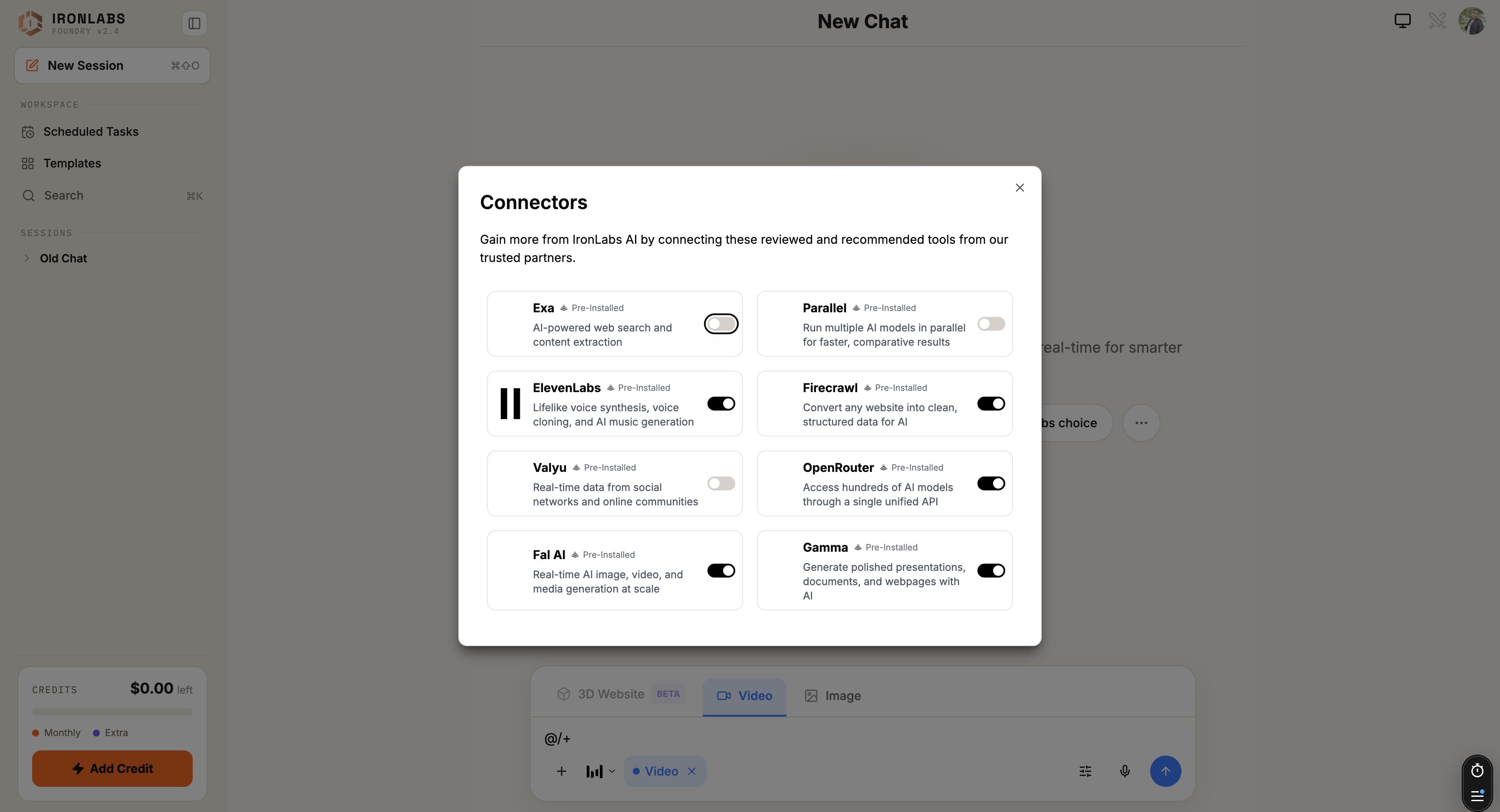
A **Connector** plugs Foundry into an external service. Once connected, the assistant can call that service inside chat — search Exa, generate speech with ElevenLabs, crawl pages with Firecrawl, build a Gamma deck.
Open the connectors panel from the composer with `+`.
 ## How it works
1. Connect a service once — you paste your API key.
2. The assistant can then call that service inside any chat where the connector is enabled.
3. Calls happen through a sandbox proxy. Your API key never leaks into the chat or the model context — Foundry adds it server-side at call time.
## Two flavors
| Flavor | What it is |
| ---------------------------- | -------------------------------------------------------------------------------------------------------------------------------------------------------------------------------------- |
| **Pre-installed Connectors** | Eight services that ship ready to wire up — Exa, Parallel, ElevenLabs, Firecrawl, Valyu, OpenRouter, Fal AI, Gamma. See [Pre-installed Connectors](/foundry/connectors/pre-installed). |
| **Custom Connectors** | Any API-key-auth service you want to plug in. See [Adding custom connectors](/foundry/connectors/adding-custom). |
## When you'd use a connector
* *"Generate a voiceover of this script in Rachel's voice."* → ElevenLabs.
* *"Crawl this competitor's pricing page and structure the tiers."* → Firecrawl.
* *"Turn this outline into a deck."* → Gamma.
* *"Spin up 4 model responses in parallel to compare."* → Parallel.
## Tips
* **Connect once, use everywhere.** Connectors are per-account, not per-chat.
* **Toggle off when you don't want them.** The `+` menu lets you enable/disable per-chat so you don't accidentally burn quota.
## Limits
* All connectors today are **API-key auth**. OAuth flows aren't yet wired up.
* Some connectors meter usage on your account (you bring your own key, you pay your own bill).
## Related
The eight that ship with Foundry.
Put Foundry into your Zaps.
Anything with an API key.
Skills often pair with a connector.
## How it works
1. Connect a service once — you paste your API key.
2. The assistant can then call that service inside any chat where the connector is enabled.
3. Calls happen through a sandbox proxy. Your API key never leaks into the chat or the model context — Foundry adds it server-side at call time.
## Two flavors
| Flavor | What it is |
| ---------------------------- | -------------------------------------------------------------------------------------------------------------------------------------------------------------------------------------- |
| **Pre-installed Connectors** | Eight services that ship ready to wire up — Exa, Parallel, ElevenLabs, Firecrawl, Valyu, OpenRouter, Fal AI, Gamma. See [Pre-installed Connectors](/foundry/connectors/pre-installed). |
| **Custom Connectors** | Any API-key-auth service you want to plug in. See [Adding custom connectors](/foundry/connectors/adding-custom). |
## When you'd use a connector
* *"Generate a voiceover of this script in Rachel's voice."* → ElevenLabs.
* *"Crawl this competitor's pricing page and structure the tiers."* → Firecrawl.
* *"Turn this outline into a deck."* → Gamma.
* *"Spin up 4 model responses in parallel to compare."* → Parallel.
## Tips
* **Connect once, use everywhere.** Connectors are per-account, not per-chat.
* **Toggle off when you don't want them.** The `+` menu lets you enable/disable per-chat so you don't accidentally burn quota.
## Limits
* All connectors today are **API-key auth**. OAuth flows aren't yet wired up.
* Some connectors meter usage on your account (you bring your own key, you pay your own bill).
## Related
The eight that ship with Foundry.
Put Foundry into your Zaps.
Anything with an API key.
Skills often pair with a connector.